How to disable weird arrows in the commit message window?

Hi,
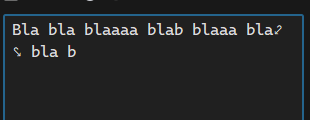
How do I disable these annoying confusing arrows in the commit window? I tried searching the settings but they are so overcrowded it's impossible to find anything so specific.
Thanks
Please sign in to leave a comment.
Rawalanche, you can disable soft wraps by placing a caret in the Commit Message field and disabling wraps via View→Active Editor→Sort Wrap
@...
Thanks for the update, but:
A: This is some of the worst feature discoverability I've ever seen.
B: It does not solve the problem, it now kicks the ball down the road. Now I am unable to see the text I've written without scrolling:
How is displaying additional characters to imply line wrapping useful for anyone? No other editor it any other software I use does that. Rider constantly feels like it's trying to overload user with as much useless information as possible. Anyone who has used a computer or a mobile device for at least a month immediately understand the concept of dynamic line wrapping. There's no point of using actual characters to comunicate that.
Completely disabling soft wrap sign/character is not possible in Rider at the moment, but you can work around this issue by replacing this character with an invisible one, for example using Zero-Width space.
Please consider voting for IJPL-29815 Cannot hide soft wrap sign.