Stuck loading a project
Answered

Hi Rider community,
I've been using Rider with Unity quite successfully until today Rider started loading a project and froze. I tried to clean caches, kill sln files, restarting rider, unity and computer; even installed latest Rider 2018.1.4 but no success.
The error pops up in console
Project 'Assembly-CSharp' load failed: Unable to connect to MSBuild process
IDE is stuck loading projects.
I'd appreciate any help.
Vlad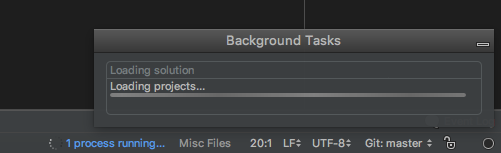
Please sign in to leave a comment.
Hi Vlad!
Thanks for your request!
Please check if the problem persists on the newest RIder version (2018.2.3).
If so, could you please attach a screenshot of "File | Settings | Build, Execution, Deployment | Toolset and Build" and clarify your OS.
Kind regards,
Sofya.
Hello Sofya,
I'm encountering almost the same problem in new 2018.3 Rider. It does so only for one of my projects, basically as soon as I open the project the rider is completly frozen and I cannot do anything at all. I tried to clean the cache, delete the sln files, restarted pc etc. nothing really helped. I have to kill force kill the rider to even quit it and it does so 100% of the time so I cannot even work with this version of Rider. It only does so on one of my macbooks (I have one for work and one personal)
I'm running:
macOS 10.14.1
Unity 2018.3.0f2
Rider 2018.3
I had to downgrade to Rider 2018.2.3 where this project works fine.
Screenshot is from Rider 2018.3 but different project, same settings as I cannot take screenshot from frozen Rider.
Hello Martin Novak,
Could you please collect the Rider 2018.3 logs as described here? Please attach them to a new support request. We'll do your best to fix it shortly.
On Rider 2020.1.4 after installing it manually in Unity, Macos Catalina 10.15.6, same happened. This was the first launch of a c# script. I could only force quit the application. I had restarted the computer before trying to launch the c# script. After force quitting, I restarted the macos again to open the c# script and worked when switching to EAP. I think the reason may be because I had downloaded and installed rider first, then the toolbox and updated rider. Unity preferences had external script editor rider 2020.1.4 and EAP 7 version. After switching to EAP 7 it worked. VEry confusing for a new user like myself, suggest you clarify or make easier installation.
But then when coding with EAP, variables are not highlighted, bold, show where they come from, type, etc, so I changed back to 2020.1.4 and the IDE seems to work correctly.
So if I keep 2020.1.4 in Unity preferences i'll be using the latest rider as it updates via toolbox or I need to set EAP?
Hi,
Could you please collect all Rider logs as described here and attach them to a new support request?
RIDER 2020.1.4 is the latest release version. RIDER 2020.2EAP is a kind of beta version for the next release.
If you have issues when using the latest EAP, we would be grateful if you report them on youtrack: https://youtrack.jetbrains.com/.