quick input "private" or any other keyword, Do not want add space automatically.

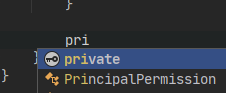
when i press "Enter", add sapce automatically after private。
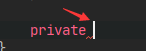
I don't want this space。can i edit this setting?
like "void" or "int" keyword, not automatically add space when press enter。
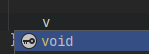

it is ok.....
Please sign in to leave a comment.
Hello,
Currently completion for access modifiers always adds space at the end.
Could you share with us, why you prefer having no spaces after access modifier completion? Do you just want to have the same completion experience with access keywords as with built-in types or do you have some other goal in mind?
Because When I use Visutal Studo, input keywords without Spaces. But the main reason is that I hope the keyword input behavior to be uniform.
Similar to “void" "int" "float" or any..
I have now solved the problem, use Live Template.
Thanks for the update.
I've created a feature request on our tracker. Please, feel free to upvote or comment on the issue.
Let me know if you have any other questions.