Reformat insert blank lines

I'm trying to configure Rider to adhere to the code conventions that Resharper (in Visual Studio) adhered to. Rider will force the settings for blank lines, which results in undesired extra blank lines, as shown below.

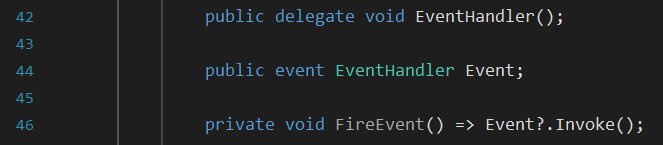
Are there options to prevent this from happening? If possible, I would like to disable the automatic insertion/removal of blank lines when reformatting code.
Please sign in to leave a comment.
Hello @...,
Please, check the "Around single-line type" and "Around single line auto/abstract property/event" settings under File | Settings | Editor | Code Style | C# | Blank Lines.
If you are using Rider 2020.3 EAP you can also remove the blank lines manually (like on your first screenshot), select lines 42-44, and call Format selection -> Detect formatting settings to show a list of the style settings that should likely be altered.
Kirill Filin Thanks for the response. The Detect formatting settings option does seem useful, but it does not seem to be available for me (using Rider 2020.2.4)
However, I think I figured it out. Setting the number of blank lines for Around method (and others) to 0 will prevent the formatter from inserting extra whitespace, and it will keep up to 1 blank line when formatting. This is the behaviour I was after.
Thanks for the update!
Detect formatting settings is a feature in Rider 2020.3 that will be released later this month and is currently available in the EAP.