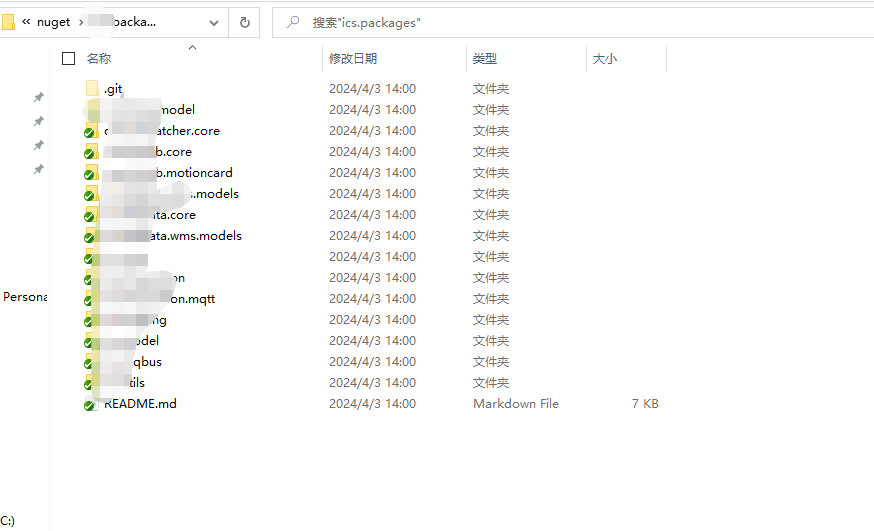
I have a doubt if the Nuget packages in the subfolders under that folder are not recognised, I tried this file path:D:\Ggg\nuget\ggg.packages\ggg.basemodel\BaseModel.1.0.0.00.nupkg, which will be:D:\Ggg\nuget\ggg. packages was added to the configuration, but it didn't work, all packages must be placed directly in :D:\Ggg\nuget\ggg.packages to be recognised
I was unable to reproduce the same issue you have described. Could you please check if you observe the same issue with any solution on your machine? Also, please share your NuGet config file and screenshot of the NuGet | Sources toolwindow in Rider where the problematic NuGet feed is visible.

Hi,
1. Create a folder on your machine for having your local NuGet packages inside (ex. LocalNuGetFeed)
2. In Rider NuGet tool window go to Sources tab and add a new source there. URL = the full path to the LocalNuGetFeed folder.


3. Put your package into this folder and press `Reload` in NuGet tool window in Rider.
K.R.
Sofia
I have a doubt if the Nuget packages in the subfolders under that folder are not recognised, I tried this file path:D:\Ggg\nuget\ggg.packages\ggg.basemodel\BaseModel.1.0.0.00.nupkg, which will be:D:\Ggg\nuget\ggg. packages was added to the configuration, but it didn't work, all packages must be placed directly in :D:\Ggg\nuget\ggg.packages to be recognised
Hello boat ,
I was unable to reproduce the same issue you have described. Could you please check if you observe the same issue with any solution on your machine? Also, please share your NuGet config file and screenshot of the NuGet | Sources toolwindow in Rider where the problematic NuGet feed is visible.
Thank you in advance.
@Ivan Skorikov

sure,Everything works fine when I use the following configurations
bu
but, When I use the following configuration, I cannot find the corresponding nuget package, all packages are in the corresponding folders

Hi! Could you please submit a new ticket using the Help | Contact Support action and share the following info in that ticket:
Thank you in advance!