Problems with .NET unit testing

JetBrains Rider automatically detects unit tests and provides a unit test runner to run and debug them. We are continuously improving unit testing with JetBrains Rider, but there are still some areas which are not supported.
So what is currently supported and what is not?
| Supported since 2017.2 | |
| Unit testing Frameworks |
xUnit NUnit Classic MSTest (Windows-only) MSTest v2 (.NET Core projects - cross-platform, .NET Framework projects - Windows-only) |
| Runtime |
.NET Framework .NET Core Mono (4.8+ recommended) |
If you experience any issues with a supported unit testing framework on a supported runtime, please create a request and describe the problem in details, as it will help to sort it out timely. The following information is essential to determine the cause of the issue:
Environment
- OS version, for example, Windows 10 or Mac OS X 10.8
- JetBrains Rider version: Help -> About
- Unit testing framework version, for example, xUnit 2.2.0
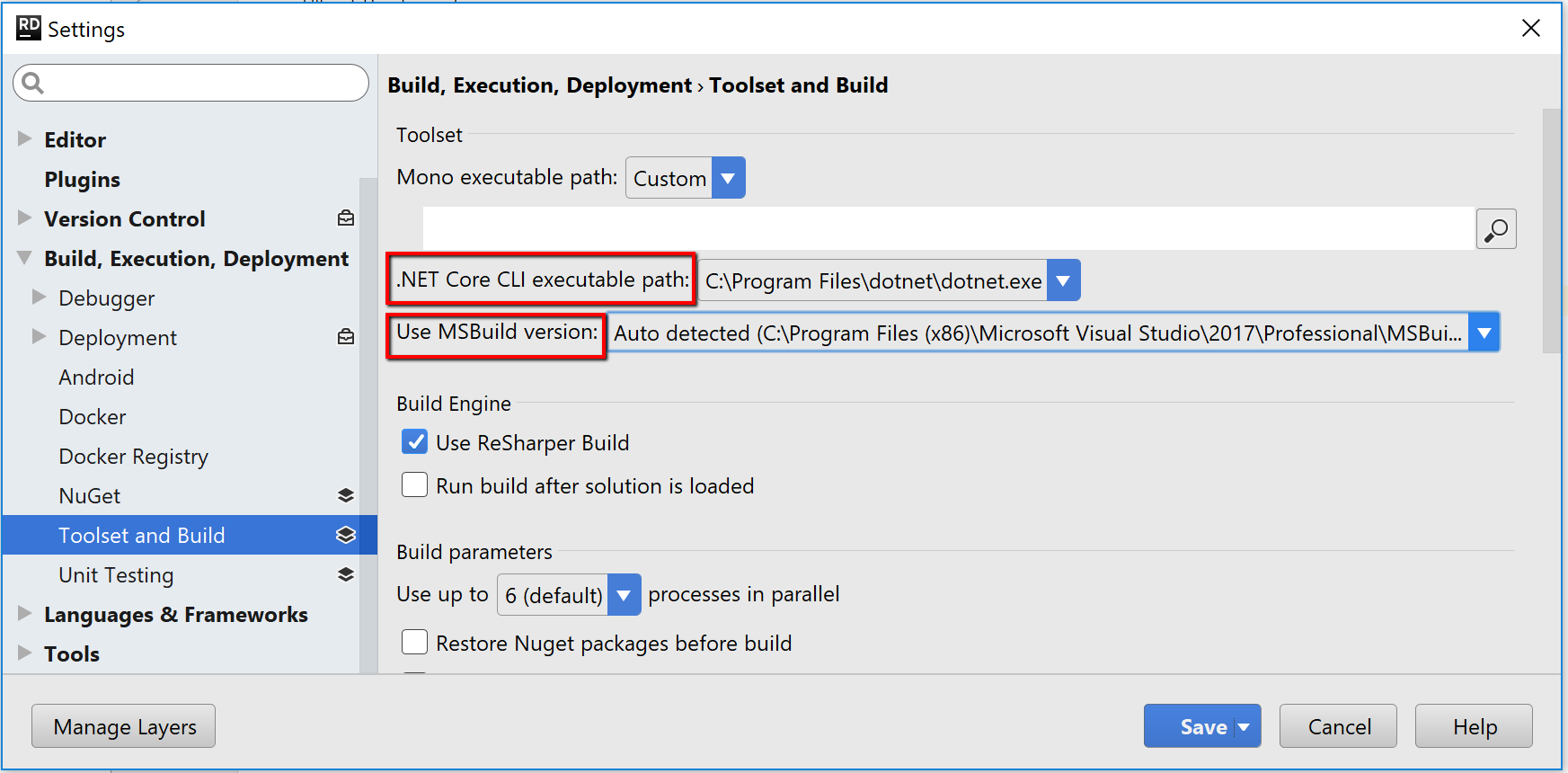
- MSBuild version: Settings -> Build, Execution, Deployment -> Toolset and Build (find screenshot below)
- .NET Core version in case you have .NET Core project:
- Check a path to dotnet executable via Settings -> Build, Execution, Deployment -> Toolset and Build (find screenshot below)
- Go to the directory with dotnet executable via terminal
- Run "dotnet --version" command
Log Files
- Build your solution and then collect Rider logs: Help -> Collect Logs
- Run Unit Tests if you can see them in unit test explorer
- Get launch log files: Launch settings -> Show Last Launch Log (find screenshot below) or click on gear icon -> Diagnostics -> Show Last Launch Log
- Get unit test process log files as described here
- Attach the logs to the request

Additional information
- Sample solution where the issue reproduces is very much appreciated
- Can you see your unit tests in unit test explorer?
- Are there any steps to reproduce the issue?
- Has it worked in the previous version of JetBrains Rider?
Thank you for helping us make JetBrains Rider better!
Please sign in to leave a comment.
Unit tests would fail to start with error 134, and I had to reinstall the app to get it to work. No upgrade, already using the latest build. More details below.
```
Exit code is 134 (Unhandled exception. System.BadImageFormatException: Could not load file or assembly '/Applications/Rider.app/Contents/lib/ReSharper...
Last runner error: Process /usr/local/share/dotnet/dotnet:14817 exited with code '134': Unhandled exception. System.BadImageFormatException: Could not load file or assembly '/Applications/Rider.app/Contents/lib/ReSharperHost/TestRunner/netcoreapp2.0/ReSharperTestRunner32.dll'. An attempt was made to load a program with an incorrect format. File name: '/Applications/Rider.app/Contents/lib/ReSharperHost/TestRunner/netcoreapp2.0/ReSharperTestRunner32.dll'
```
This issue started today without any particular reason, I was just in the middle of a coding task, running multiple solutions, with multiple Rider instances. I tried to clean the repo, removing .idea, obj/bin folders, etc. I also uninstalled .NET 2.2x just in case. The .NET app was working fine, but unit tests would fail to start. Every project is based on .NET Core 3.1 but tests seems to be looking for netcoreapp2.0
JetBrains Rider 2020.2
Build #RD-202.6397.244, built on August 10, 2020
Runtime version: 11.0.7+10-b944.20 x86_64
VM: OpenJDK 64-Bit Server VM by JetBrains s.r.o.
.NET Core 3.1.6
macOS 10.15.6
@... Nikola @...,
This seems like a known issue. Please, try running tests against x64 platform explicitly via "Session Options" - I'm attaching a couple of screenshots as a reference.

To add to this, in Rider 2018.1.3 the settings within the unit test runner settings (see screenshot) are not respected in the unit test runner itself. The "Automatic" option was still selected while the platform architecture was set to x64.
Same problem as @Devis described, with the same error message and a .net core 3.1 project.
Rider 2020.2 on MacOS 10.14.5. Tests were running fine then out of nowhere started failing with that exception.
Running Unit Tests with Coverage resolved the problem for the time being.
I seem to be unable to debug unit tests in
JetBrains Rider 2018.2.3
Build #RD-182.4231.496, built on September 13, 2018
Licensed to Gary Woodfine
Subscription is active until November 5, 2018
JRE: 1.8.0_152-release-1248-b8 amd64
JVM: OpenJDK 64-Bit Server VM by JetBrains s.r.o
Linux 4.15.0-36-generic
The debugging of Unit Tests was working this morning but it seems to just randomly stopped working. I have shut down and restarted rider, rebooted machine. bu the problem keeps recurring. I am actually able to Run the tests, using Rider and Dotnet Test. but when I try debug,
I Get Exception below.
I have tried to CLEAN , RESTORE and Rebuild several times. I created a blank file api.tests.xunit.runner.json
I've run into an issue after upgrading. It appears as if the "Run <n> number of assemblies in parallel" option is not being honored. I have some Nunit test assemblies that cannot be run in parallel so I have that setting set to 1. In previous versions, my tests worked out fine. Since upgrading I'm getting massive test failures that seem to indicate that some of these assemblies are either not being unloaded properly. I would like to find out if there is a work around or if anyone has seen this issue.
I meant deleting folder in the file-system:
Xm,
Please file an issue on YouTrack: https://youtrack.jetbrains.com/issues/rider
Thank you!
It should be "Open log file" in the Build Toolwindow.

Unfortunately it seems, that Rider does not fully support non-deterministic xUnit tests, like ones based on AutoFixture. It seems that it's a problem with pre-enumeration.
I've built a small example at https://github.com/drivenet/rider-xunit-discovery-problem
Load solution, restore packages, build the project.
Now, run all tests -- everything seems OK.
Now, try to run the "DetectedProperly" test only -- it works.
Then -- try to run the "NotDetectedProperly" test only -- it either becomes "Unknown, test nor run" or "Inconclusive".
Should I file a bug somewhere?
We are unable to run tests without rebuilding all dependencies for dotnet core projects. Our integration test project depends on a huge number of other related projects and every time someone tries to run tests they have to wait for about 1 minute for the build to finish, despite the fact that no code has been changed.
Rider 2023.3.4, MacOs Sonoma 14.4.1., .NET 8, platform set to x64
--- EXCEPTION #1/1 [LoggerException]
Message = “Process /usr/local/share/dotnet/dotnet:32877 exited with code '138'.”
https://youtrack.jetbrains.com/issue/RIDER-35463
Somehow in my windows machine if you have a global.json configuration it can make the rider works weirdly, you can try to delete it if you have and see if it make it works
Same problem as the above two individuals. Trying to run XUnit against .NET Core 3.1 / .NET Standard 2.1 projects. Tests have only recently started failing (possibly since the latest Rider update).
Running Rider 2020.2 on Mac OS 10.15.6.
Thanks Kirill Filin that helped.
Just a "me too" from me, I'm afraid, same thing started yesterday. I've found "Invalidate Caches / Restart..." makes it work again for a few runs.
For the BadImageFormatException, changing this setting to x64 seems to have fixed the problem.
Getting an exit code 139 whenever a unit test runs a struct's public override string ToString() method.
I'm on MacOS 11.0.1 even though the version below shows 10.16 =\
JetBrains Rider 2020.3
Build #RD-203.5981.141, built on December 11, 2020
Licensed to Second Dinner / Mike Schweitzer
Subscription is active until January 8, 2021
Runtime version: 11.0.9.1+11-b1145.24 x86_64
VM: OpenJDK 64-Bit Server VM by JetBrains s.r.o.
.NET Core 3.1.8
macOS 10.16
GC: ParNew, ConcurrentMarkSweep
Memory: 1450M
Cores: 16
Registry: debugger.new.debug.tool.window.view=true, ide.tree.horizontal.default.autoscrolling=false, performance.watcher.sampling.interval.ms=200, ide.borderless.tab.caption.in.title=false, ide.tooltip.showAllSeverities=true, show.diff.preview.as.editor.tab=true, debugger.show.values.use.inlays=false, undo.documentUndoLimit=10000, light.edit.file.open.enabled=false, performance.watcher.unresponsive.interval.ms=1000, ide.tree.expand.navigatable.on.double.click.disabled=true, search.everywhere.settings=true, show.diff.preview.as.editor.tab.with.single.click=true, parameter.info.max.visible.rows=10, ide.win.file.chooser.native=true, undo.globalUndoLimit=1000, vcs.log.show.diff.preview.as.editor.tab=true, actionSystem.fix.alt.gr=false, search.everywhere.pattern.checking=false, ide.tooltip.initialDelay=0, ide.require.transaction.for.model.changes=false, ide.debug.in.title=true, ide.new.project.model=false, rdclient.asyncActions=false
Non-Bundled Plugins: com.jetbrains.rider.fsharp, PythonCore, aws.toolkit
same like Nikola and Davis.
I have installed Rider 2020.3 and developing a dotnet 3.1 console application.
And change platform Architecture to "x64" doesn't help at all.
I do run "Cover Selected Unit Test" and get :
Frank01 Bergmann, it seems to be the same issue as this one: https://youtrack.jetbrains.com/issue/RIDER-29932.
Please reproduce it in a newer Rider version 2021.1, collect logs and attach to this issue. Also, having a sample solution/example would be very much appreciated.
K.R.
Sofia
Hi, I'm running Rider 2021.2.1 and am unable to see any variable values while running NUnit tests. All I get on the variables is" The name 'variable' does not exist in the current context" as shown below.

Hi Iestyn Jones,
Could you please enable `Debugger` tracing in `Help | Diagnostic Tools | Choose Trace Scenario`, then reproduce the issue once again, collect logs via `Help | Collect Logs`, disable tracing, and share the full log bundle via submitting a new support request (https://rider-support.jetbrains.com/hc/en-us/requests/new)?
Adding Microsoft.NET.Test.Sdk solved the problem for me.
I was trying to use XUnit and FluentAssertions but the Microsoft package seems to be needed for Rider to recognize tests in your solution.
The marketing page for Rider quotes NUnit test support. Is this only for .Net Framework and not .Net Core projects? There is no template for a .Net core Nunit test project:
For now I am using NunitLite to debug and run tests.
OK Cool! Honestly didn't think of that!! Thats a cool feature I was blissfully unaware of! Thanks for letting me know
@Alex
NUnit dotnetcore is not working in the current release.
However it is already fixed in Re# and will get to Rider 2017.2.
https://youtrack.jetbrains.com/issue/RSRP-464912#comment=27-2312068
Kevin,
Thanks for your feedback! Do I understand correctly that you've changed Platform Type in the NuGet tool window (screenshot 2), but it was not changed accordingly in Unit Testing settings (screenshot 1)?
Not quite, the second window was the unit test settings. Before taking the screenshot it looks like I'd already fixed the setting, but the unit test tools (window?) didn't use the setting I'd set in the Settings window for the architecture. I took the screenshot after manually setting the arch to x64 and verifying it worked.
Unable to edit the above comment
But I am using .net core 2.1
I noticed the debug output had some additional info. I am going to attempt to recreate the unit project and see if the problem recurs
I tried creating a Fresh Unit Test project Using dotnet new xunit and wrote a simple unit test and the problem recurs.